Admaya

Showing posts with label windows 8. Show all posts

Saturday, June 2, 2012

Adding Media Center to Windows 8 Release Preview


Windows Media Center is not preinstalled in Windows 8 Release Preview. If you want to use Windows Media Center, you need to add it by following these steps:
  1. Swipe in from the right edge of the screen, and then tap Search.
    (If you’re using a mouse, point to the upper-right corner of the screen, and then click Search.)
  2. Enter add features in the search box, and then tap or click Add features to Windows 8.
  3. Tap or click I already have a product key.
  4. Enter this product key: MBFBV-W3DP2-2MVKN-PJCQD-KKTF7 and then click Next.
  5. Select the checkbox to accept the license terms and then click Add features.Your PC will restart and Windows Media Center will now be on your PC and the tile will be pinned to the Start screen.

Monday, September 19, 2011

Windows 8 Immersive Metro UI Start Page For Web Browsers


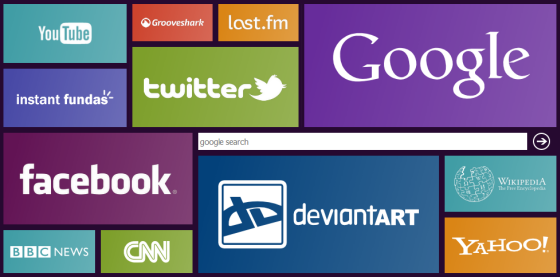
The Windows 8 Immersive Metro UI for tablet PCs that Microsoft demoed a short while ago has left quite an impressions among Windows enthusiasts. One DeviantArt user has coded a start page in HTML, CSS and JQuery intended to be used as new tab page in browsers, that mimics the tile-based Metro UI interface.

By default, the start page contains shortcuts to twelve popular websites such as Google, Yahoo!, YouTube, Facebook, Twitter, CNN, Grooveshark etc, but all the shortcuts and images on the start page can be customized and tweaked easily by modifying JavaScript file which contains all the settings.
eight-startpage
To use Windows 8 Metro UI-styled homepage on your web browser, simply download EIGHT - Firefox start page, unpack to a location in your hard drive and set the index.htm file as the homepage in your browser. If you want the start page to open every time you open a new tab, configure your browser to open the homepage as the new tab page.
To customize the shortcuts you have to create the images containing the logo or name of the websites, place them inside the folder ‘thumbs’ and then edit the file source.js and replace the URLs. The logos look best when set in white with alpha transparency. In simpler terms – transparent images with white logos. The background image of each tile can be changed too, by replacing the images under the folder ‘lib’. You can also change the search engine to Bing or Yahoo.

Windows 8 Developer Preview Video